

Managing Business Expense Reports with Microsoft Excel
Monitoring business expenses can prove challenging if your organization does not have an organized plan to track them. This should include a standardized business expense report and copies of expense receipts. Employees should understand the importance of clarity and accuracy when they submit their report to avoid resubmissions later.
Keeping track of your business receipts should be mandatory and not optional. Your employee should understand the importance of this and realize how this may impact the accuracy of their report if the receipts are not present. Lost receipts can be retrieved by contacting the vendor to get a copy. The employee should realize that this is their responsibility especially if they expect reimbursement for those types of expenses.
Your standardized business expense report should have different areas to account for your employee expenses. There should be an area of GL accounts numbers, GL account names, date and location of expenses, and if necessary mileage calculations. This information will greatly assist your accounting team when they reconcile the expenses!
Lastly, your business expense reports should be submitted on a set timed schedule. It should be encouraged to submit them weekly or monthly. This should be mandatory and not optional. The goal is to reconcile for expenses in a timely manner so they company can see where their funds are being spent and if they are being used responsibly.
To get employees on board with this, try incentive based rewards in the first few months to get them used the new timed schedule. This template below is available for download in Excel 2007.
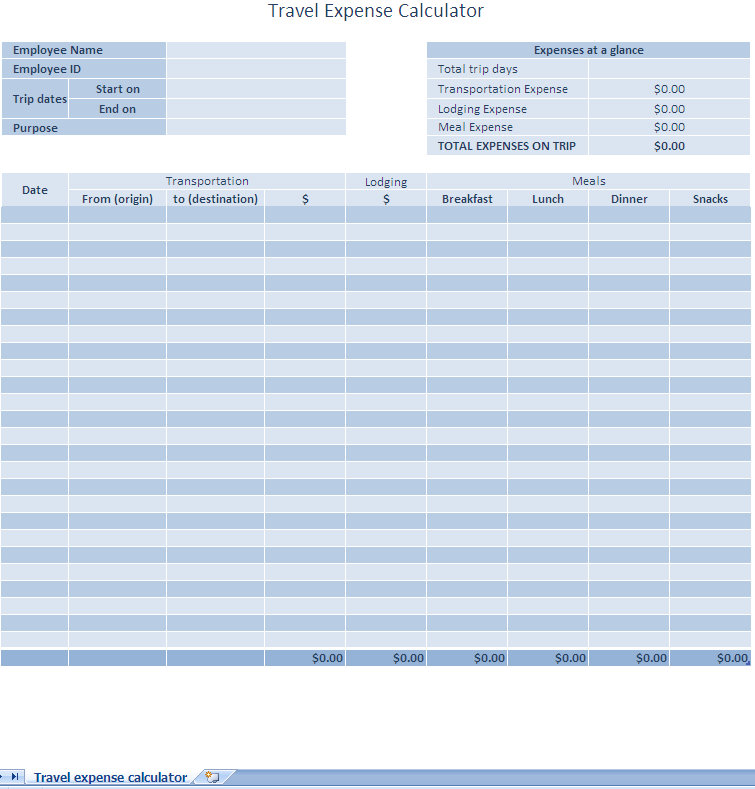
Excel templates are an excellent tool to use when you are standardizing your business expense reports. Most companies already have Office or a similar product loaded on their company computers so using Excel templates can assist in this standardization process.
Download: Expense Report Management with Excel Template
Check out this offer while you wait!